Feb 24, 2020

REMEMBER TODAY - Just Nick Studio

Hi there friends!
Nathalie with you today sharing a new project filled with bright and happy memories.  I am so hoping for Spring to arrive, so, i am making my own Spring on my pages with this colorful page filled with flowers and cut files from the JustNick Studio shop.


As soon as i saw the new OPEN FLORAL BACKGROUND, the idea of creating a panel for my layout formed in my mind.  So, i shrunk the design to be 6x6, then used the Silhouette software to weld two of the backgrounds together to create the panel  die cut for the page.


While the background was cutting, i added a bit of white paint and Fossilized Amber Distress Oxide  on a sheet of turquoise cardstock.  In addition, i used the time to fussy cut a few floral images from the Dear Lizzy's She is Magic collection.


To assemble the page, i  first glued the panel onto the background.  The picture was then placed on the page surrounded by all the fussy cut florals.   I cut the word always 4 times from white cardstock using the LOVE YOU ETERNAL cut file.  The die cuts were stacked together as to form a dimensional die cut and this was glued onto the cluster of florals at the bottom of the picture.
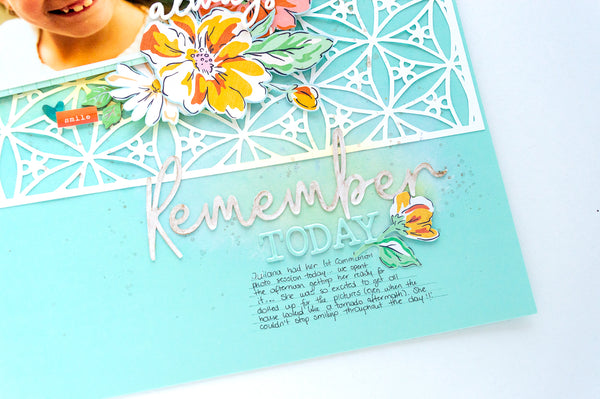


To create the title, i cut the word Remember from the REMEMBER FLORAL cut file twice from white cardstock. Then stacked the die cuts together and finished by adding a light coat of shimmer watercolor on top.   The word along with some alphas complete my page.


Just love how quick and easily this page came together.   The soft panel die cut is the perfect background for this memory of my niece.  Remember to stop by the Just Nick Studio shop to check the cut files used here and all the new designs available.
'Til next time!


Feb 22, 2020

ALTENEW PAINT-A-FLOWER: ROSE RELEASE BLOG HOP + GIVEAWAY


Hi there!
Welcome to the ALTENEW PAINT-A-FLOWER: ROSE RELEASE BLOG HOP + GIVEAWAY, you are arriving from  Jenny Colaccico's blog. A list of all the participants is available at the bottom of this post.
It is time for  a new flower to join in the PAINT-A-FLOWER family.  The new PAF: ROSE is one you want to add on your collection.  The delicate but detailed image is perfect for all types of projects, or just to practice your coloring.  I chose to work a layout for my Family album with this stamp.


I wanted the flowers to be the focus of this project, so i pulled a few pictures of my daughter and i to create this page.


It all started by creating the flower corners on the layout using the stamp and Altenew's Black Obsidian Pigment ink.  I chose to have the  images as if they were coming into the page, and only occupy the edges of the page.


Here is where i put on my audio book, pulled the new Artist Watercolor Palette and color the flowers.  This time, i decided to start each flower with a light wash of yellow watercolor, and then build the color of each flower by adding pigment to each petal making sure to concentrate the watercolor in areas toward the center of the flower.


Once i finished coloring ( 2+ hours) i used a fine white gel pen to add small details to the centers of the filler flowers and the petals of each flower. The small dots and lines help to create the illusion of roundness and dimension on the page.   The following video will show you how it all came together:


I just love how the page turned out! The new PAF: ROSE is sure a must have in your collection.   Remember to check the stamp at the Altenew shop, or better yet sign up for the PAF Susbcription program:


This is a monthly subscription plan for our Paint-A-Flower set. When signed up, you are guaranteed a spot in our monthly PAF releases and will receive a set each month - at a specially discounted price! ($15.99 →$12.99)


And now onto the fun part of this blog hop.... GIVEAWAY time

To celebrate this release, Altenew is giving away a $30 gift certificate to 5 lucky winners! Please leave a comment on the Altenew Card Blog and/or Altenew Scrapbook Blog for a chance to win.

We’ll also draw a winner to receive a $15 gift certificate from the comments left on each designer’s blog on the blog hop list below. All winners will be announced on the Altenew blogs on 03/02/2020.

Good Luck everyone!

This is it for me, and now it is time to stop by the Altenew Scrapbook blog . Remember you can always come back here to complete the loop or visit the Altenew Card blog or Altenew Scrapbook Blog to start the hop. A list of all the participants is available here:


Thank you so much for joining me today!

XO


Feb 17, 2020

FABULOUS YOU - Scrapbook Nerd


Hi there!
This week, the DT at Scrapbook Nerd is working with stencils to create their projects.  I chose to create my background by combining a few stencils, materials and textures in the background of my layout.


I started with a piece of Marshmallow cardstock from Bazzill.  First i used a Vicki Boutin script stencil and diluted acrylic paint (Dina Wakely) to create the impression on the page.  By applying the paint with a stencil brush, it is easy to control the richness of color and also create the ghost effect of the application. 


Using Acrylic paint helps to prevent the impression from disappearing when adding the watercolor layer ( VB watercolor markers).  Then to finish the background work, i  added a bit of texture using VB Rose Gold glaze and a Kaisercraft stencil.  This time, i run the glaze with a palette knife on the stencil, thus creating the bumpy texture on the background.


While the background completely dried, i used Heidi Swapp's Honey and Spice collection to build all the paper layers behind the picture.  I tried to add the bulk of the papers towards the left of the picture,  for this, i reached for a cut file from Just Nick studio to help me elongate the paper cluster to the left of the picture.   I set all these on the top right side of  the page.


When the background was created, i made sure to add a small section of mixed media to the side of  the page, so that i could balance the layout.  I used a few of the collection's embellishments to create a small cluster and then used Kaisercraft Stickers to construct my title as a link between the two corners of the page.


I love how this turned out, especially with the beautiful Boston Terrier image on the collection.  The following video will show you how the page came together:


Don't forget to stop by the shop to check the materials used in this page, and please do not hesitate to contact me with any questions

XO